Posts

April 2021 Tip: Formulas for Circles and Spheres

Image
This is a quick two-page download that contains Formulas for Circles and Spheres . It contains 14 formulas for Circles and Spheres and is good to have in any Notebook for quick reference. Formulas include how to find the circumference of a circle, how to find the diameter of a circle, how to find the area of a circle, how to find the surface of a ball (sphere), how to find the cubic inches (volume) of a ball, and more! Properties of a Circle image is also included in the PDF file. I have provided a sample image below of the first two formulas that are included in the PDF. Contact me if you would like me to email the full PDF file to you. Sample image of the PDF file you will receive Please check back frequently for more machinist tips on www.MachinistKalc.com . Some of the best tools of this trade are the charts that you keep nearby. 

April 2021 Tip: Decimal Equivalents

Image
This is just a quick PDF on Decimal Equivalents. A sample image of the Table of Decimal Equivalents of 8ths, 16ths, 32nds, and 64ths of an Inch is shown below.  This PDF is easy to download and print, making it easy for you to put it at your machine so you don't risk losing the good plastic ones! Contact me if you would like me to email the full PDF file to you. a small sample of the PDF you will receive Thanks for visiting  www.MachinistKalc.com  today. Keep this chart nearby to find powerful decimal equivalents.

March 2021 Tip: Gage Block Excel Calculator Program

Image
GBS: Is an Excel File to calculate Gage Block Build up. Just input the Build up needed into the "Input Inch" cell and it will list the Gage Blocks needed to obtain the total. It uses a "81" piece and a "35" piece gage block set. PLEASE DO NOT PURCHASE THIS IF YOU PLAN TO USE THIS WITH ANY OTHER GAGE BLOCK SETS. USE WITH 81 PIECE AND 35 PIECE GAGE BLOCK SETS ONLY.  If the value needed can't be calculated, "False" will  show up in Cells B:19 or C:19. Can be used on any device with an Excel program installed. See how this program works Buy now for $5.00   You will be directed to Payhip to make your payment when you click on Buy Now below. After paying, you will receive a download link on the screen as well as your email address. Buy Now Thanks for visiting www.MachinistKalc.com today.

Desired Chamfer Program for GraphNCalc83

Image
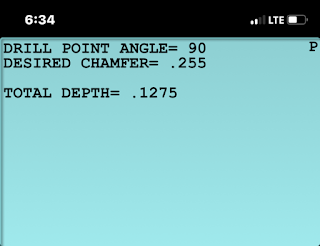
DISCLAIMER HOW TO CALCULATE DESIRED CHAMFERS: Is a program to calculate the Desired Chamfer Diameter of 30, 60, 82, 90, 118, 120, and 135 degree spot drills. Choose the angle and the desired chamfer diameter and you will be given the depth to go to after touching off in "Z" axis. Use email account on your iPhone, open with GraphNCalc83. You should receive a message "Imported Successfully". Watch how this program works Buy now for $2.00   You will be directed to Payhip to make your payment when you click on Buy Now below. After paying, you will receive a download link on the screen as well as your email address.   Buy Now If the button doesn't load, please try opening this page in a browser like Chrome, Firefox, or DuckDuckGo. Alternatively, click HERE to purchase directly. Thanks for visiting www.MachinistKalc.com today.

February 2021 Tip: Drill Tip Length Calculator

Image
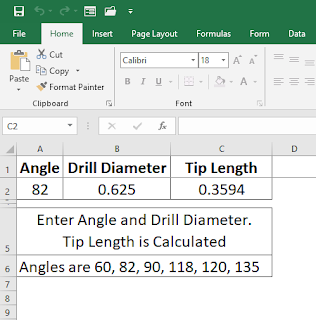
  This is a Drill Tip Length Calculator used to calculate from the tip to the OD of the drill of  60, 82, 90, 118, 120, 135 degree drill tips.  Just enter the angle and the drill diameter, and the length will automatically be calculated in the tip length cell. If you have Excel on your iPhone, this will work. No need to buy my Drill Point Program. You may download the Drill Point Program . Or  contact me if you would like this free Excel sheet to be sent to you.    Thanks for visiting  www.MachinistKalc.com  today. I hope you enjoy this and all future machinist tips I'll be offering frequently on this site.

February 2021 Tip: GD&T Symbol References

Image
 Download the PDF or Excel copy of these GD&T symbols, or you may  contact me  and I will be happy to email these to you. These can easily be printed and taped inside your toolbox for quick reference. Thanks for visiting  www.MachinistKalc.com  today. I hope this sheet of symbols will be helpful to you.

How to Import and Basic Settings

Image
 Here's a small video on how to Import the MachinistKalc Program from your iPhone email to the GraphNCalc83 App. Here are the settings from the "Mode" button that have worked for me.  Thanks for visiting  www.MachinistKalc.com  today.

GraphNCalc83 App

Image
This app is one of the best things that has ever happened to the iPhone. The creator of the app, Ernest Brock, was very helpful and was always quick to respond to my questions. This is the number one app I use on my phone now. I have also provided a post with a video about how to import my programs onto your iPhone as well as the basic settings to use for my programs.  When you download the program from Payhip to your iPhone, browse to your downloads and tap it. It will open automatically in GraphNCalc83. You will get "Imported Successfully". Thanks for visiting  www.MachinistKalc.com  today.

External Pipe Threads Program for GraphNCalc83

Image
DISCLAIMER HOW TO CALCULATE EXTERNAL PIPE THREADS: Is a program to calculate the taper and threads on CNC Machine.  Just choose the size and press enter. The program has been updated (1/28/2023) to include 1/8-27, 1/4-18, and 3/8-18 pipe OD threads. Here is what is displayed: Taper Small End= Taper Large End= Taper Length (L2)= Thread Starting point in X= Thread Starting point in Z= Thread Length (L4)= Thread Height= 10 Sizes from 1/2"-14 to 4"-8. All Calculations are based from the Machinery's Handbook 29th ed.  and the program ME ThreadPal by Close Tolerance Software.  User should back the offset for the Thread tool by at least .010  then move in accordingly. I have tested these as best I can but  the user should also do their own testing. Use email account on your iPhone, open with GraphNCalc83. You should receive a message "Imported Successfully". Watch how this program works Buy now for $2.00   You will be directed to Payhip to make your payment when y...

Internal Pipe Threads Program for GraphNCalc83

Image
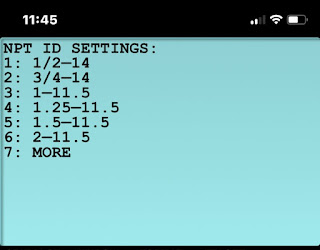
DISCLAIMER HOW TO CALCULATE INTERNAL PIPE THREADS: Is a program to calculate the taper and threads on CNC Machine. Just choose the size and press enter. Here is what is displayed: Taper Small End= Taper Large End= Taper Length (L2)= Thread Starting point in X= Thread Starting point in Z= Thread Length (L4)= Thread Height= 10 Sizes from 1/2"-14 to 4"-8.  All Calculations are based from the Machinery's Handbook 29th ed. and the program ME ThreadPal by Close Tolerance Software. User should back the offset for the Thread tool by at least .010 then move in accordingly. I have tested these as best I can but the user should also do their own testing. Use email account on your iPhone, open with GraphNCalc83. You should receive a message "Imported Successfully". Watch how this program works Buy now for $2.00   You will be directed to Payhip to make your payment when you click on Buy Now below. After paying, you will receive a download link on the screen as well as your ...